Guide · Followers & following
How to See Who You Recently Followed on Instagram
by igtrackr · Published 2026-11-22
Your Following list doesn't open in date order, so the account you followed yesterday can be anywhere in it. Instagram lets you re-sort your own list by the date you followed each account. Here are the steps, what the sorted list does and doesn't tell you, and what to do if the option is missing.
TL;DR
Go to your profile, tap Following, tap the arrows next to Sort by Default, and choose Date followed: Latest. The accounts you followed most recently move to the top. The sort shows order, not dates; for exact dates, download your information from Accounts Center. It only works on your own Following list; for another public account, use a recent-follows tool instead.
Why the Following list looks out of order
You followed an account a few days ago, you cannot remember its name, and scrolling your Following list does not help. That is because the list does not open in date order. It opens on "Default", an order Instagram does not explain, so the account you followed yesterday can be anywhere in it.
The fix is one setting. Instagram lets you re-sort your own Following list by the date you followed each account, newest first. It has been in the app since February 2020, and it is the only list on Instagram you can sort by date.
How to see who you recently followed: 5 steps
- Open the Instagram app and tap your profile picture in the bottom-right corner to go to your profile.
- Tap Following — the number at the top of your profile, next to Followers.
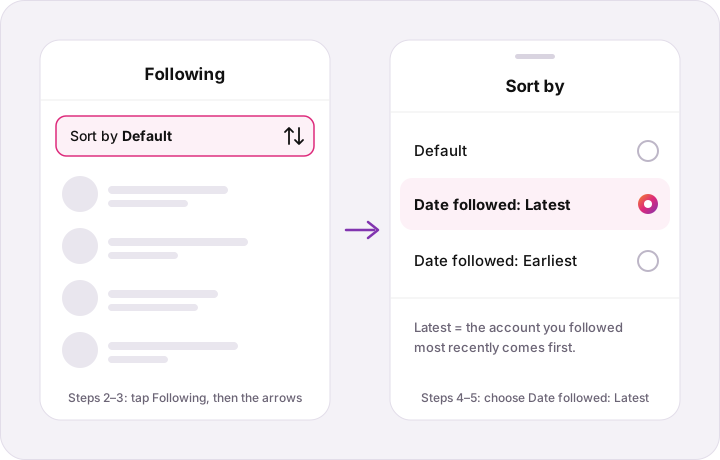
- Find the sort row. Near the top of the list there is a line that reads "Sort by Default" with an arrows icon beside it.
- Tap the arrows to open the sort options: Default, Date followed: Latest, and Date followed: Earliest.
- Choose Date followed: Latest. The list reloads with the account you followed most recently at the top, then the one before it, and so on.
To go the other way and see the first accounts you ever followed, pick Date followed: Earliest instead. To get back to the normal view, choose Default.
What the sorted list tells you — and what it doesn't
The sorted list gives you order, not dates. You can see which account you followed most recently and which came before it, but the list does not print the day you followed each one. For most people that is enough: the account you are trying to find is somewhere in the first screen.
If you need actual dates, Instagram's data download has them. In Accounts Center, under your information and permissions, you can request a download of your information; the file you get back includes the accounts you follow with the time you followed each one. It takes a while to arrive, so it is a tool for an audit, not a quick look.
The sort also only covers accounts you still follow. If you followed someone and then unfollowed them, they are no longer on the list, so they will not show up at the top however recently it happened.
Using the oldest-first sort to unfollow
The same sort works in reverse: Date followed: Earliest puts the accounts you followed years ago at the top, which is a quick way to find ones you no longer care about. Tap the Following button next to an account to unfollow it; the other account is not notified.
If you don't see the sort option
The sort row appears only on your own Following list. If you opened the Following list from someone else's profile, it will not be there — that is expected, not a bug. Go back to your own profile and open Following from there.
It is also only in the Instagram app. On instagram.com in a desktop browser, the Following list opens as a pop-up with a search box and no sort at all — we checked on November 22, 2026. If you are on a computer, use the search box to look for a name, or switch to your phone.
It is also only on the Following list. Your Followers list has no date sort, so you cannot use this method to see who started following you most recently; your notifications tab is the place for that.
If you are on your own Following list and the row is still missing, update the Instagram app and reopen it. Instagram changes this screen from time to time, and an old version may lay it out differently.
Seeing who someone else recently followed
This is a different question, and the app does not answer it. On another account's profile the Following list has no sort row, and its default order is not the order they followed people in — the guide to whether Instagram followers are in chronological order explains what that order is and is not.
For a public account, igtrackr's Recent Followers tool shows who that account recently followed and its newest followers, sorted by recency. You paste the handle — no Instagram login or password — and it is free with an igtrackr account. Private accounts cannot be read by any tool, because their lists are not public.
See who a public account recently followed
Opens igtrackr's Recent Followers tool. Free with an igtrackr account; no Instagram login.
Frequently asked
Quick answers
- How do I see who I recently followed on Instagram?
- Open your profile, tap Following, tap the arrows next to Sort by Default and choose Date followed: Latest. The account you followed most recently appears at the top of the list.
- Can I see the date I followed someone on Instagram?
- Not on the list itself, which shows order rather than dates. Instagram's data download, requested from Accounts Center, includes the accounts you follow with the time you followed each one.
- Why is there no sort option on my Following list?
- The sort only appears on your own Following list, not on someone else's and not on your Followers list. It is also missing on instagram.com in a desktop browser, which only has a search box. If you are on your own list in the app and it is still missing, update the app and reopen it.
- Can I see who I unfollowed recently?
- Not with this sort. It only covers accounts you still follow, so anyone you have unfollowed is no longer on the list.
- Can I see who someone else recently followed?
- Not in the app, because other people's Following lists have no date sort. For a public account, igtrackr's Recent Followers tool shows who it recently followed, sorted by recency, with no Instagram login.
Keep reading